
WhatsApp Conversational Commerce: A Practical Guide for SME Sales and Marketing Directors
What is WhatsApp conversational commerce?
WhatsApp conversational commerce means selling to customers inside a WhatsApp chat. The customer asks questions, gets product suggestions, places an order and often pays, all in the same chat.
A chatbot answers simple questions at any hour. A salesperson takes over for complex questions, price talks and large orders. The customer sees one chat thread from start to finish.
For SMEs, this matters for three reasons:
- Customers are already there. You do not need to get them to install a new app.
- Replies are fast. A lead that gets an answer in minutes is more likely to buy than a lead that waits hours for an email.
- Small teams can cover more leads. A bot handles the repeat questions, so your staff spend their time on buyers who are ready.
This guide is for SME owners and sales and marketing directors. It covers which WhatsApp product to use, how to set up a sales process in retail and real estate, how to run the team, which numbers to track and which rules you must follow. Examples come from Singapore, but the steps work in any market where customers use WhatsApp.
The main point: buying the tool is the easy part. The hard part is designing when the bot hands the chat to a person, so the customer never has to repeat themselves.
Why WhatsApp is the main channel for chat-based sales
WhatsApp has more than 3 billion monthly users, according to Meta's Q1 2025 earnings call (Quasa summary). The WhatsApp Business app alone had 200 million monthly users by June 2023 (Backlinko).
Three facts make it a strong sales channel for SMEs:
- Reach. Most of your customers already use it every day for personal chats.
- Attention. Messaging vendors often report WhatsApp open rates near 98%, with most messages read within minutes. These are vendor figures, not audited data, so test them on your own list.
- Payment in the chat. Since May 2023, Singapore businesses on the WhatsApp Business Platform can take card and PayNow payments inside the chat, through Stripe (Stripe newsroom). Local shops such as Baker's 13 and Tye Tye were among the first users (The Digital Banker).
Customers in Singapore also expect businesses to be on WhatsApp. Small retailers and F&B operators already use WhatsApp Business to take orders and answer questions. Banks use it too: DBS launched DBS Wealth Chat in 2018 so wealth clients can talk to their relationship managers on WhatsApp and WeChat, with the bank archiving every chat (DBS newsroom).
WhatsApp Business App vs WhatsApp Business Platform (API): which one does an SME need?
If more than two or three people sell through WhatsApp, use the WhatsApp Business Platform (API). The free app works for a solo owner. It does not work for a team.
| WhatsApp Business App | WhatsApp Business Platform (API) | |
|---|---|---|
| Cost | Free | Charged per message sent, by message type and customer country |
| Best for | One owner or a very small shop | Sales teams of three or more |
| Team access | Limited linked devices on one number | Many agents on one number through a shared inbox |
| CRM connection | No | Yes, through a solution provider |
| Chatbots and automation | Basic auto-replies | Full chatbots, WhatsApp Flows, lead routing |
| In-chat payment (Singapore) | No | Yes, through Stripe |
| Setup | Download the app | Sign up through a Meta Business Solution Provider |
Pricing note. Since 1 July 2025, Meta charges per delivered template message, not per 24-hour conversation. The price depends on the message type (marketing, utility or authentication) and the customer's country code. Messages that are not delivered are not charged (Gallabox, Zoho). Ask your provider for the current Singapore rates before you build a budget.
WhatsApp sales features, matched to each stage of the sales funnel
Use each feature at the stage where it does one clear job. Teams that turn on every feature at once usually use none of them well.
| Funnel stage | Goal | Features to use |
|---|---|---|
| Top: find leads | Start a chat with interested people | Click-to-WhatsApp ads, QR codes, website chat button |
| Middle: qualify and engage | Learn budget, need and timing | Chatbot, WhatsApp Flows, product catalog |
| Bottom: close | Take the order and payment | Cart, payment links or in-chat payment |
| After the sale | Get repeat orders | Opt-in alerts: restock, price drop, refill reminder |
Click-to-WhatsApp ads
These are Facebook and Instagram ads with a "Send Message" button. A click opens a WhatsApp chat with your business. The lead skips your website form, so fewer people drop out.
WhatsApp Flows
Flows are short forms inside the chat, with drop-down lists, checkboxes and date pickers. Use them to qualify a lead, book an appointment or collect feedback.
CRM integration
Connect WhatsApp to your CRM so contacts, chat history and lead status sync both ways. Without this, you cannot report on WhatsApp sales or automate follow-ups.
Shared team inbox
A shared inbox lets many agents answer from one business number. Managers can assign chats, add internal notes the customer cannot see, and check the status of every conversation.
WhatsApp for retail and eCommerce: a step-by-step sales funnel
In retail, the whole sale can happen in one chat: ad, product choice, cart, payment and repeat order.
The five steps
- Capture. Run Click-to-WhatsApp ads. Put QR codes on receipts, packaging and shop counters to collect opt-ins.
- Guide. A chatbot asks what the customer needs and shows items from your WhatsApp catalog.
- Close. The customer adds items to a cart. Send a payment link, or use in-chat payment where it is available.
- Recover. If the customer leaves a cart, send a message that asks what stopped them, and answer the question.
- Repeat. With opt-in, send back-in-stock alerts, price drops and refill reminders.
Five tactics that raise order value
- Cart recovery by chat. Ask a question, not just "you forgot something". A reply lets you fix the real problem, such as size, delivery date or price.
- Upsell from chat history. The agent or bot can see what the customer asked before and suggest a matching item.
- Segmented offers. Send different offers to new buyers, repeat buyers and high spenders.
- Voice notes and short videos. Use them to show a product in use or to answer a detailed question.
- Cash on delivery to prepaid. In markets with many cash-on-delivery orders, send a message with a small discount for paying first. This cuts failed deliveries.
Results reported in case studies
The figures below come from vendor case studies. The brands are not named, so treat them as examples, not benchmarks.
| Business | What they did | Reported result |
|---|---|---|
| Global beauty brand | Price-drop alerts for VIP customers, refill reminders, back-in-stock alerts | 67% higher conversion on price-drop alerts, 30% more repeat purchases, 2.3x revenue per customer |
| European fashion retailer | QR codes on receipts to grow opt-ins, then order updates and cart reminders | 97% open rate, 29.9% click-through rate, 3.75x conversion rate within 60 days |
| JioMart (India) | Customers order groceries by typing plain requests such as "I need rice and eggs" | About 10% of abandoned carts recovered |
WhatsApp for real estate: faster replies and more viewings
In real estate, WhatsApp does not close the sale. It gets the lead a fast reply, books the viewing and keeps the buyer informed until the deal is signed.
Property sales are large, rare and slow. Buyers need to trust the agent. Cold calls feel pushy. A WhatsApp thread gives the buyer one written record of every answer, photo and document.
Real result: Propseller, Singapore
Propseller is a Singapore real estate agency that gets hundreds of WhatsApp messages a day. Before it changed its setup, some messages were missed and slow replies lost buyers. It moved to the Bird shared inbox, tagged messages by topic and urgency, and set up automatic replies for common questions (Bird case study).
- Sales conversions rose 250%. Propseller measures this through its arranged-viewings rate.
- Wait times for buyers fell by 60%.
The lead-to-viewing playbook
- Capture. Run Click-to-WhatsApp ads aimed at one group, such as HDB upgraders or condo investors in one district. Replace website "Contact us" forms with a WhatsApp chat button. Send portal leads from PropertyGuru and 99.co to the same number.
- Qualify. A chatbot replies at once, at any hour. It asks: HDB or private? What budget? When do you want to buy? It tags the lead Hot, Warm or Cold in the CRM.
- Route. A Hot lead goes straight to the next free CEA-registered agent in the shared inbox, with the full chat history.
- Engage. The agent sends floor plans, e-brochures, virtual tour videos and a map pin, then books a viewing with a calendar link.
- Remind. The system sends reminders 24 hours and 1 hour before the viewing, then asks for feedback after it.
- Close. Clients send ID and forms in the chat. Instalment buyers get payment reminders. Buyers of new launches get construction updates with photos.
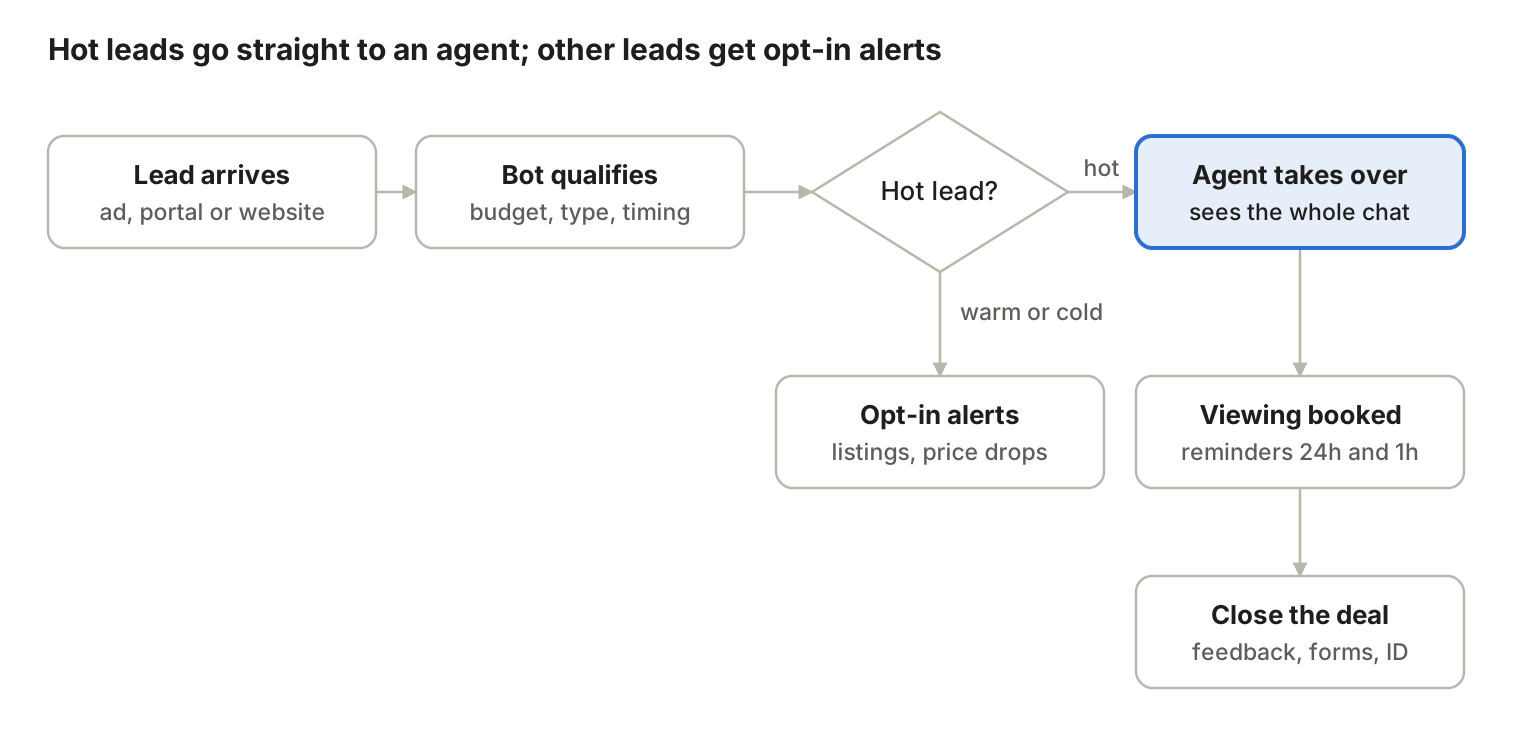
The bot sorts every lead in minutes. Only Hot leads go to an agent. The other leads get only the alerts they agreed to receive.
Warm and Cold leads do not get dropped. With their opt-in, they get new-listing and price-drop alerts that match what they told the bot.
How to run a WhatsApp sales team
Do not let each salesperson sell from a personal WhatsApp number. Chats get lost, follow-ups get missed, and the manager cannot see anything. Put the whole team on one business number with a shared inbox.
Choose a lead distribution model
| Model | How it works | Use it when | Risk |
|---|---|---|---|
| Round-robin | Leads go to agents in a fixed rotation | Agents have similar skills and leads are similar | A strong lead can go to a junior agent |
| Rule-based routing | Leads go by rules: region, language, deal size | Leads differ a lot, or you have specialists | Rules need regular review |
| Open queue | Agents pick leads from a shared list | A small, self-driven team | Hard leads get ignored. Set a reply-time limit and check the queue daily |
Whatever model you use, give every lead one named owner. Show the owner in the shared inbox tag or the CRM field, so two agents never chase the same buyer.
Split the work between bot and people
| The bot does | People do |
|---|---|
| Reply at once, at any hour | Handle complex questions and objections |
| Answer FAQs and order tracking | Negotiate price and terms |
| Ask qualifying questions and score the lead | Build trust on large purchases |
| Send Hot leads to an agent | Close the deal |
| Flag angry or urgent chats for a manager | Fix problems the bot cannot fix |
The handoff is where most setups fail. When the bot passes a chat to a person, the agent must see the full chat history. The customer must never have to repeat their answers. Test the handoff yourself before you launch.
Track these KPIs instead of "calls per day"
| KPI | What it measures | How to calculate it |
|---|---|---|
| First response time | How fast a lead gets a first reply | Time from first customer message to first business reply |
| Conversation conversion rate | How many chats become sales | Chats that end in a sale ÷ all sales chats |
| Revenue per conversation | How much each chat is worth | WhatsApp revenue ÷ number of sales chats |
| Lead-to-viewing (or lead-to-demo) rate | How well qualification works | Viewings or demos booked ÷ qualified leads |
| Opt-out rate | Whether your messages are welcome | Opt-outs ÷ contacts messaged |
WhatsApp Business rules and PDPA: a compliance checklist
Breaking WhatsApp's Business Messaging Policy can get your number limited or banned. The sales director owns this risk, not the vendor.
Checklist
- Get clear opt-in before you send the first message. The customer must take an action: tick a box, scan a QR code or send a keyword. Keep a record of when and how they agreed.
- Know the 24-hour window. When a customer messages you, you can reply freely for 24 hours. After that, you can only send a pre-approved template message.
- Make opt-out easy. Honour "STOP" and similar words. Remove the person from every list at once, even if they asked by phone or email.
- Never ask for sensitive data in chat. Do not ask for full card numbers, bank account numbers or NRIC numbers. Use a secure payment link instead.
- Do not sell banned products. WhatsApp bans firearms, alcohol, tobacco, drugs and adult services, among others.
- Keep your business profile accurate. Use your real name, logo, address and hours. Never pose as another business.
- Follow Singapore's PDPA. Collect only the data you need, tell customers why you collect it and protect it. Check with your legal adviser whether Do Not Call rules apply to your marketing messages.
These rules push you away from cold outreach and towards inbound selling. You earn the right to message a customer by giving them something useful first.
Writing rules for sales reps
- Be friendly but correct. Use full words and correct spelling. Use emojis only if they fit your brand.
- Keep messages short. Two or three sentences per message, one idea per message.
- Respect the customer's time. Send your own outreach in working hours. Let the customer set the pace.
- Use media. A short voice note, photo or demo video often explains more than text.
- Use a simple first message. Say who you are and which company, the problem you can solve, and one easy next step, such as "Shall I send you more details?"
Six steps to start WhatsApp selling in your SME
Start with one small pilot, measure it, then expand.
- Find where you lose customers today. Map your current sales process. Mark where leads wait longest or drop out. Start there.
- Pick the right tools. For a team of three or more, choose the WhatsApp Business Platform with a solution provider that offers a shared inbox and a link to your CRM.
- Run one pilot. Retail: a cart recovery flow. Real estate or B2B: a lead qualification bot. Run it for 30 to 60 days.
- Change your KPIs. Track first response time, conversation conversion rate and revenue per conversation. Stop counting calls per day.
- Train your team. Selling by text is a separate skill. Train reps to write short, clear messages, handle several chats at once and use voice notes and video.
- Make compliance part of onboarding. Every new rep learns the opt-in, opt-out and 24-hour rules on day one. Keep an auditable record of every opt-in.
What to expect next
AI chatbots are getting better at long, multi-step chats. They can already draft replies, summarise long threads for agents and suggest products during a live chat. More countries are getting in-chat payment. Plan your setup so a customer's history follows them across WhatsApp, web chat and social media messages.
FAQ
Is the free WhatsApp Business app enough for a sales team?
No, not for more than two or three people. The free app does not give a shared inbox, CRM sync or full automation. Use the WhatsApp Business Platform (API) through a solution provider.
How much does the WhatsApp Business Platform cost?
Since 1 July 2025, Meta charges per delivered template message. The rate depends on the message type and the customer's country. Your solution provider also charges a platform fee. Ask for both before you sign.
Can customers pay inside WhatsApp in Singapore?
Yes. Since May 2023, Singapore businesses on the WhatsApp Business Platform can accept cards and PayNow in the chat through Stripe.
What is the 24-hour rule on WhatsApp?
After a customer messages you, you can reply freely for 24 hours. After that, you can only start the chat again with a pre-approved template message.
Do I need consent to message customers on WhatsApp?
Yes. You need clear opt-in before you send any message the customer did not ask for. Keep a record of the opt-in, and remove anyone who opts out at once.
Will a chatbot replace my salespeople?
No. The bot handles fast replies, FAQs and lead scoring. Your salespeople handle negotiation, objections and large deals. The bot gives them more time for that work.